Wednesday, October 1, 2025

What is FinOps in VMware Cloud Foundation?


FinOps (Financial Operations) is all about helping IT teams and business leaders understand, control, and optimize cloud spending. VMware Cloud Foundation (VCF) builds FinOps right into the platform, so cost management becomes a natural part of daily IT operations not just a concern for finance departments.

Cost Management Made Simple

 
VCF gives teams a clear view of how much their cloud costs, making it easy to track expenses across compute, storage, network, licenses, and support. There’s a central dashboard that shows usage, budgets, cost optimization opportunities, and ROI in one place—making cloud budgeting and cost analysis much more manageable.

Chargeback and Showback

Chargeback: VCF lets organizations bill teams or departments for exactly what they use. This makes cost allocation fair and transparent, supporting audits and helping teams take responsibility for their spending.

Showback:
VCF can also report usage and costs without billing, helping different business units understand how much they're consuming. This drives awareness and accountability, encouraging everyone to use resources wisely.

Total Cost of Ownership (TCO) and Visibility
VCF provides deep insights into infrastructure costs, including hardware, software, labor, facilities, and services. That means organizations can see and manage the full financial impact of their cloud operations, making smarter decisions about modernization and scaling.

Cost Planning and Analysis
VCF tools allow users to estimate workload costs before they deploy, test “what-if” scenarios, and forecast the impact of scaling up or down. Cost analysis features help pinpoint where money is being spent, highlight optimization opportunities, and make smart choices about future investments.

Multi-Tenancy and Billing
With support for multiple tenants like departments or project teams, VCF offers detailed bills through automated, error-free generation and scheduling. Tenants get monthly, itemized bills that clarify charges and support dispute resolution or cost cutting.

Rate Cards and Flexible Pricing
Providers use rate cards to set standardized resource costs (CPU, memory, storage), ensuring fairness for both chargeback and billing. VCF collects usage data accurately for fair, customized pricing across different teams or regions.

Strategic Value
By embracing FinOps in VCF, businesses get clear financial transparency, powerful cost optimization, and the flexibility to innovate confidently. The end result is a smarter, more strategic cloud operation—every investment delivers measurable value for both business and IT outcomes

I hope this has been informative and thank you for reading!

Friday, July 18, 2025

What Makes VCF 9.0 Stand Out?


VMware Cloud Foundation 9.0 is designed to help businesses get the speed and agility of the public cloud, with the control and cost efficiency that you expect from running things on-premises. It brings together servers, storage, and networking as software-powered resources, giving teams a single platform to run their virtual machines, containers, and even advanced AI workloads—all side by side. Developers now get self-service APIs so they don’t have to wait for ticket requests, and operators enjoy one unified set of tools for everything.


Major New Features

Unified Operations Console: All cloud management happens from one user-friendly interface. This means easier troubleshooting, faster onboarding, and consistent policy management everywhere.

Developer-Friendly Cloud Experience: Developers interact with just one endpoint for infrastructure as code, using tools like Terraform or REST APIs. No more juggling lots of extras—just build, deploy, and go.

Flexible Workload Support: VCF 9.0 runs virtual machines and containers side by side, with built-in tools for continuous integration and delivery. Apps can scale up or down across your private and hybrid cloud without needing major rework.

Sovereign Security & Compliance: VCF 9.0 introduces tags to track where data lives, automated certificate rotation, and strict policy controls. This makes meeting security and regulatory requirements much easier, no matter where your data resides.

Embedded Cost Controls: The new dashboards show how much resources cost, helping leaders manage budgets, set limits, and track usage with invoice-ready numbers.

More Highlights


Quick Start Deployment: Get up and running faster with built-in governance and automated setup—making cloud launches easy and compliant from day one.

Advanced Security: The vDefend system now lets teams set fine-grained security and firewall policies for specific application zones, keeping workloads safer than ever.

Stronger Performance: Technologies like memory tiering, improved vMotion, and global deduplication in vSAN drive greater efficiency and resilience for demanding workloads—even AI and machine learning.

Simplified Lifecycle Management: All cluster upgrades, patches, and configurations are organized for your whole cloud fleet, with minimal downtime and maximum consistency.

Multi-Tenancy Built-In: Now you can create isolated cloud zones (VPCs) for departments or customers, each with its own settings and policies. Great for businesses that want to keep things separate but under one big umbrella.

Why Upgrade?


In short, VCF 9.0 is designed to make private cloud easier, faster, and more securehelping businesses innovate without the usual headaches of complexity, cost surprises, or compliance worries. Whether you’re running traditional apps, cloud-native containers, or new AI services, this platform lets you do it all on a single, unified foundation

I hope this has been informative and thank you for reading!

Sunday, March 30, 2025

What’s New in vSphere Kubernetes Service 3.3?

VMware vSphere Kubernetes Service 3.3, which used to be called VMware Tanzu Kubernetes Grid (TKG) Service, is now GA available. With this launch, you get the latest vSphere Kubernetes release 1.32, which is based on the newest version of Kubernetes. This update helps you keep your clusters modern, secure, and ready for the latest application features.


Key Features and Enhancements

Support for Kubernetes 1.32: Now you can deploy workload clusters using the most recent Kubernetes technology for better performance, stronger security, and compatibility with today’s software.

Enable OS FIPS Mode: Administrators can easily switch on FIPS mode at the operating system level, making sure only government-approved cryptography is used. This is important for meeting strict security rules, and it works for both Linux and Windows clusters. Note that Ubuntu clusters may need an Ubuntu Pro subscription for this feature.

Transition to Cluster API: VMware is moving from the old TanzuKubernetesCluster API to the new Cluster API, which offers better automation, easier cluster management, and supports future needs. Planning this transition soon is recommended, as the old API will be removed after June 2025.

Windows Integration with Active Directory: Windows nodes can now join an on-premises Active Directory and use Group Managed Service Accounts for safer sign-in. This is helpful for businesses that use Windows and want simple, secure identity management.

Cluster Autoscaler Improvements: Your clusters can now automatically scale up from zero nodes, or scale down to zero when not in use (starting with VKr 1.31.4 and later). This means you can save money by using resources only when you need them.

Upgrade Guardrails: New safety checks make sure upgrades go smoothly and prevent errors, especially when moving between versions that change important features or remove older ones.

Why Upgrade?

This new release makes your Kubernetes environments more secure, lets you save on costs by using only the resources you need, and helps your teams manage clusters more easily. It’s designed for businesses that want modern, efficient, and safe container workloads, without extra hassle.

I hope this has been informative and thank you for reading! 

Thursday, February 27, 2025

Make Storage Simple with VMware vSAN and VMware Cloud Foundation

Are you tired of spending too much time and energy on managing complicated storage solutions? If you work in IT, you probably know how hard it can be to keep everything running smoothly especially when you have to use different systems and deal with lots of maintenance tasks every year. 

Many companies use traditional storage setups that can feel confusing and need dedicated experts just to install and look after them. This often means long hours trying to plan and set up storage, and sometimes you have to juggle several systems spread across different places. Sounds stressful, right?

Here’s the good news: VMware vSAN, a key part of VMware Cloud Foundation, is here to make things much easier. Instead of dealing with lots of separate systems, vSAN brings everything together, making it much simpler to handle your storage. It’s built right into VMware vSphere and VMware Cloud Foundation, so you don’t have to work on different systems for storage and virtual infrastructure. You can set up, expand, or update everything at once, saving time and effort.


With these VMware tools, your team can manage all the parts of your private cloud from one place. This means faster decisions and a more organized workflow. Plus, it doesn’t matter where your private cloud lives—whether it’s in the data center, at the edge, or in the public cloud—you can use the same setup everywhere. This helps make your work less complicated, keeps your security strong, and makes following the rules much easier.


How Does vSAN Help?

vSAN is built directly into VMware vSphere, so there’s no need for extra software or storage systems.

Data is safe, thanks to built-in protection features like encryption and automated backups.

You don’t need to be a storage expert: setup and ongoing management are fast and simple.

vSAN lets you start small and grow as you need, just by adding more storage or servers when ready


What is VMware Cloud Foundation?

VMware Cloud Foundation (VCF) is a complete platform that combines the core building blocks of a cloud: compute (servers), storage (like vSAN), and networking, all managed together with simple tools.

With VCF, you can run your business applications on your private data center, remote offices, or even in a public cloud. The system looks and feels the same everywhere, making it easy to move and manage workloads across different locations. 

Key Benefits

Unified management: Everything is handled in one place, saving time and removing confusion.

Built-in automation: Many tasks, like software upgrades and resource provisioning, happen automatically so there’s less routine work for IT teams.

Easy scalability: Need more resources? Just add more servers or storage and the platform grows with you.

Strong security and compliance: Consistent security settings are easier to maintain, no matter where your infrastructure lives 

So, if you’re ready to say goodbye to storage headaches, consider switching to VMware vSAN and VMware Cloud Foundation. It’s a smart way to make your IT life simpler! 

I hope this has been informative and thank you for reading!

Friday, September 27, 2024

vSphere 8 Security Configuration & Hardening


The VMware vSphere Security Configuration & Hardening Guide (SCG) has evolved significantly over the past fifteen years, remaining an essential resource for virtualization administrators committed to fortifying their infrastructure. With each new release of vSphere, the SCG adapts, integrating emerging security threats and best practices tailored for a modern landscape where virtualized environments are frequently targeted. This guide empowers administrators to adopt a proactive security stance by offering detailed recommendations that transcend basic hardening techniques, such as pausing unnecessary services and implementing secure configurations. 

In today’s dynamic hybrid cloud ecosystems, virtualization security requires more than just compliance; it ignites a culture of vigilance within organizations. By actively engaging with the SCG's frameworks for auditing and continuous monitoring, enterprises can ensure their configurations remain robust against continuously evolving vulnerabilities. Administrators can harness automation tools to simplify adherence to these guidelines while elevating their risk management strategies—turning what was once a mere compliance checklist into a vibrant part of their overall security posture. Embracing this holistic approach not only protects sensitive data but also instills confidence in stakeholders reliant on the secure performance of virtualized infrastructures.

Download the Latest Version

The Security Configuration & Hardening Guide for VMware vSphere 8 can be downloaded Vsphere 8 security configuration & Hardening guide.

I hope this has been informative and thank you for reading!

Thursday, July 18, 2024

VMware Private AI Foundation with NVIDIA

The VMware Private AI Foundation with NVIDIA has officially crossed the threshold into general availability, marking a pivotal moment for enterprises eager to harness the power of AI while maintaining control over their data. The team behind this integration has unveiled two dynamic dashboards dedicated to GPU monitoring within VCF Operations. These dashboards not only enhance visibility into resource usage but also empower IT administrators with real-time insights, allowing them to optimize performance and preemptively address potential issues.


Additionally, a treasure trove of customizable PowerCLI scripts has emerged as part of this release, simplifying the setup process for users diving into VMware's powerful AI capabilities. These scripts serve as a flexible foundation that can be tailored to meet specific organizational needs, thereby accelerating deployment times and reducing time-to-value. With these advancements, the VMware Private AI Foundation is positioned as not just a solution but a robust framework designed to streamline operations and maximize efficiency in an increasingly competitive landscape.

we explore the new features in the VMware Private AI Foundation with NVIDIA. This is an add-on product to the VMware Cloud Foundation (VCF). The set of AI tools and platforms within that VMware Private AI Foundation with NVIDIA platform are developed as part of an engineering collaboration between VMware and NVIDIA.

We describe the technical values that this new platform brings to data scientists and to the DevOps people who serve them, with the following outline

  • Providing an improved experience for the data scientist in provisioning and managing their AI platforms using VCF tools
  • Deep learning VM images as a building block for these data science environments
  • Using a Retrieval Augmented Generation (RAG) approach with NVIDIA’s Large Language Model (LLM) microservices
  • Monitoring and your GPU consumption and availability from within the VCF platform
The outline architecture for VMware Private AI Foundation with NVIDIA to see how the different layers are positioned within it with respect to each other. We will dig into many of these areas in this article and how they are used for implementing applications on VMware Private AI Foundation with NVIDIA.


The VMware Private AI Foundation powered by NVIDIA technology transforms the landscape for data scientists, making it not only easier to provision resources but also simplifying ongoing management tasks. By leveraging Aria Automation, the platform allows teams to focus more on modeling and inference rather than getting bogged down by infrastructure details. This abstraction means that the complexities of cloud or on-premises deployments are seamlessly managed behind the scenes, enabling data scientists to harness powerful tools without needing deep technical expertise in virtualization or orchestration. Using a set of pre-configured Deep Learning VM images as a starting point accelerates deployment time and ensures consistency across projects. This curated environment is designed with optimized performance in mind, allowing practitioners to dive straight into their work with minimal setup hassle. Furthermore, VMware’s approach fosters innovation, as data scientists can experiment freely—spinning up different solutions swiftly while remaining insulated from infrastructure constraints. The synergy between VMware and NVIDIA not only streamlines operational efficiency but also propels organizations forward in their AI endeavors by reducing friction and enhancing productivity at every stage of the workflow.

I hope this has been informative and thank you for reading!

Tuesday, February 13, 2024

VMware vSphere Foundation

VMware vSphere Foundation embodies the essence of robust infrastructure management, laying a powerful groundwork for businesses seeking to navigate the complexities of a rapidly evolving digital landscape. With its unparalleled stability and performance, VMware has long been a trusted provider of infrastructure solutions for businesses worldwide. This reliability not only streamlines operations, but also instils confidence that enterprises can pivot swiftly in response to changes — whether scaling up resources or adapting to new workloads.

vSphere's ability to seamlessly integrate with existing technologies, enhancing flexibility without forcing organizations into an uncomfortable technology overhaul. As businesses increasingly emphasize hybrid environments and seek multi-cloud strategies, the versatility offered by VMware solutions becomes indispensable. Moreover, vSphere's proactive resource management tools empower IT teams to optimize their infrastructures intelligently, ensuring that organizations are equipped with the necessary agility and resilience needed in today’s market dynamics. By leveraging such innovations, companies are not just maintaining business continuity; they are unlocking the potential for astonishing growth and transformation.

VMware vSphere Foundation offers an ideal transition path for those currently using vSphere Enterprise Plus, or vCloud Suite Standard. At the same time, customers with lighter requirements such as basic hardware consolidation or virtualization on a very small number of servers are still able to use vSphere Standard or vSphere Essentials Plus Kit.

VMware vSphere Foundation is a new integrated offering from VMware. However, to help understand the makeup of the solution, the following overview refers to the legacy components that went in to making it:

  • vSphere Enterprise Plus
  • vSphere ESXi
  • Tanzu Kubernetes Grid
  • vCenter Standard
  • Aria Suite Standard
  • Aria Operations
  • Aria Operations for Logs
  • Aria Suite Lifecycle

  • vSAN Enterprise (100 GiB per CPU Core per host)
  • Production Support

On top of vSphere Foundation, you can deploy a variety of use-case based add-ons, as follows:

  • VMware Cloud Disaster Recovery
  • VMware Ransomware Recovery
  • VMware Site Recovery
  • vSAN Enterprise (Expansion)
  • VMware Load Balancer (NSX Advanced Load Balancer)
  • Tanzu Mission Control

I hope this has been informative and thank you for reading! 

Tuesday, January 2, 2024

VMware Private AI

VMware Private AI

In the fast-paced world of AI, privacy and control of corporate data are paramount concerns for organizations. That's why the architectural approach for AI services, such as VMware Private AI, is gaining traction. By leveraging this approach, businesses can ensure that their sensitive data remains secure and protected.

This architectural approach for AI services enables privacy and control of corporate data, choice of open source and commercial AI solutions, quick time-to-value, and integrated security and management.

AI solutions for your environment—NVIDIA AI Software, open–source community repositories, and independent software vendors. Deploy with confidence, knowing that VMware has built partnerships with the leading AI providers. Achieve great performance in your model with vSphere and VMware Cloud Foundation GPU integrations. Augment productivity by eliminating redundant tasks and building intelligent process improvement mechanisms.


Benefits

  • Get the Flexibility of Choice: Get the flexibility to run a range of AI software for your environment, including NVIDIA AI Enterprise, open-source repositories, or ISV offerings with the VMware Private AI. Achieve the best fit for your application and use case.
  • Deploy with confidence: VMware Private AI offers generative AI solutions in partnership with NVIDIA and other partners, all of whom are respected leaders in the high-tech space. This enables you to securely run your private corporate data to do fine-tuning, run inferencing, and, in some cases, even training in-house.
  • Achieve Great Performance: This solution supports NVIDIA GPU technologies and pooling these GPUs to extract great performance for AI workloads. The latest benchmark study compared AI workloads on VMware + NVIDIA AI-Ready Enterprise Platform against bare metal. The results show performance that is similar to and, in some cases, better than bare metal. Hence putting AI workloads on virtualized solutions preserves the performance while adding the benefits of virtualization, such as ease of management and enterprise-grade security.
  • Augment Productivity: Leverage VMware Private AI for your generative AI models and maximize your organization’s productivity by building private chatbots and enabling automation of repetitive tasks, smart search, and building intelligent process monitoring tools.

Top Use Cases

VMware Private AI solutions enable several use cases for enterprises by securely enabling large language models’, fine-tuning, and deployment (inference) within their private corporate environment. Here is a description of the top use cases that enterprises can enable using these platforms.

  • Code Generation: These solutions accelerate developer velocity by enabling code generation. Privacy in code generation is of utmost concern. With VMware Private AI solutions, enterprises can use their models without risking losing their IP or data.
  • Contact centers resolution experience: VMware Private AI can significantly improve customer experience by improving the high-quality content, quality, and feedback contact centers provide customers with improved accuracy of responses.
  • IT Operations Automation: Enterprises can significantly reduce IT operations agents’ time by enhancing operational automation like incident management, reporting, ticketing, and monitoring using VMware Private AI.
  • Advanced information retrieval: Platforms based on VMware Private AI can significantly help in employee productivity by improving document search, policy, and procedure research.
I hope this has been informative and thank you for reading! 

Saturday, December 9, 2023

What is vSAN ESA?

vSAN ESA will unlock the capabilities of modern hardware by adding optimization for high-performance, NVMe-based TLC flash devices with vSAN, building off vSAN’s Original Storage Architecture(vSAN OSA). vSAN was initially designed to deliver highly-performant storage with SATA/SAS devices, the most common storage media at the time. vSAN 8 will give our customers the freedom of choice to decide which of the two existing architectures (vSAN OSA or vSAN ESA) to leverage to best suit their needs.


vSAN Express Storage Architecture

This new architecture will showcase some innovative ways of processing and storing data. vSAN 8 with ESA will introduce structural changes like a new log-structured file system (vSAN LFS), a new write-optimized log-structured object manager, and a new object format. All these changes will help vSAN ESA achieve near device-level performance and store data and metadata in an extremely fast and efficient way.

vSAN 8 using either architecture

vSAN 8 with vSAN Express Storage Architecture will bring innovative updates that deliver supreme performance and efficiency levels, enhanced resilience, simplified operations, and ease of management. We believe the vSAN ESA can help our customers capitalize on the benefits of the latest generation of hardware to run the most demanding workloads with the highest levels of performance and efficiency.

Additional enhancements for vSAN in vSphere 8 Update 2:
  • Integrated File Services for Cloud Native and Traditional Workloads.
  • Improved Performance for Disaggregated Environments.
  • New AF-0 ReadyNode profile for small deployments.
  • Default Auto-Policy Intelligence for optimal vSAN SPBM policies.
  • Improved Clarity with Cluster Capacity Reporting.
  • Improved Security Through Enhanced Key Management.
  • Intuitive Detection of VMs and Disks Consuming the Most Resources.
  • Improved Detection of Performance Bottleneck in Stretched Clusters.
  • Simplified configuration for 2-Node and Stretched Clusters.
vSAN Express Storage Architecture is ideal for all of our customers and cloud providers moving to this latest generation of hardware.  Delivering space-efficient and highly resilient storage without any performance compromise, using all claimed storage devices for capacity, and new compression enhancements significantly change the mathematics in favour of the vSAN ESA.

I hope this has been informative and thank you for reading!

Saturday, November 25, 2023

What’s New with VMware Cloud Foundation


VMware Cloud Foundation 5.1

VMware Cloud Foundation 5.1* delivering key enhancements across storage, networking, compute and lifecycle management to enable customers to scale their private cloud environments and improve resiliency. 

VCF Support for vSAN Express Storage Architecture (ESA)

VCF 5.1 is enhanced support for NVMe storage platforms with new support for vSAN Express Storage Architecture (ESA) that enables customers to deploy next generation servers that deliver higher performance, more scalability and improved efficiency.  By co-existing with vSAN Original Storage Architecture (OSA), vSAN ESA is an architecture designed to achieve all-new levels of efficiency, scalability, and performance optimized to exploit the full potential of the very latest in hardware to unlock new capabilities for VCF customers. 

Networking and Security Enhancements

The VCF 5.1 released contains several enhancements which simplify the configuration of advanced networking and security.  The most impactful change is the improved SDDC Manager workflows, which allow administrators to configure new workload domains and clusters with multiple physical network adapters and multiple virtual distributed switches prepared for NSX.

Other networking enhancements have been made which further leverage NSX, with a simplified and compliant topology for stretched clusters configured for vSAN OSA, and the ability to configure edge clusters without 2-tier routing.

These fine-tuned networking enhancements allow Administrators to deliver highly performant networking and security topologies which can be easily scaled and lifecycle managed.

Key enhancements available with VMware Cloud Foundation 5.1 include:

  • VMware Aria Suite Lifecycle Cloud Management integration.
  • Lifecycle management updates, including asynchronous prechecks and support for vSphere Lifecycle Manager images in VCF management domains.
  • Numerous networking enhancements for vSAN Stretch clusters, NSX Edge clusters and enhanced SDDC Manager workflows. 
  • The VMware Identity Broker service allows Administrators to connect to third party/external identity providers (IDPs) for handling and processing identities, credentials and authentication (including multifactor authentication).  OKTA is now supported as a 3rd party VMware identity broker in VMware Cloud Foundation environments.
  • New Terraform provider for VMware Cloud Foundation that enables the ability to use Infrastructure as code to deploy, operate and manage VMware Cloud Foundation with machine-readable definition files to achieve a specific desired state.   

Accelerate Data Driven Innovation in VMware Cloud Foundation

VMware Cloud Foundation from the release of the next generation of VMware Data Services Manager, as well as partnerships and Tech Previews with Google Cloud and MinIO, all of which will help customers accelerate their data-driven innovation.

VMware Live Recovery 

VMware Live Recovery, a new solution that provides protection against ransomware as well as disaster recovery across VMware Cloud in one unified console. VMware Live Recovery is designed to help organizations protect their VMware-based applications and data from a wide variety of threats, including ransomware attacks, infrastructure failure, human error, and more. By bringing together the functions of established products VMware Site Recovery Manager and VMware Cloud Disaster Recovery with Ransomware Recovery – and combining them under a unified, flexible, and SaaS based console – customers can realize comprehensive enterprise protection within a single solution.

I hope this has been informative and thank you for reading!

Saturday, October 28, 2023

VMware Cloud on AWS Sizer

VMware Cloud on AWS Sizer

Extend your private cloud vSphere workloads to AWS Cloud — securely, rapidly and easily. Get started to estimate the resources required to run various workloads within VMware Cloud on AWS.

The vSAN Sizer (at https://vsansizer.vmware.com) is a sophisticated sizing tool that will step you through the process of sizing your performance and capacity needs accurately.  The vSAN Sizer will be updated to accommodate running vSAN using the OSA, or ESA.  The desired architecture can be selected during the sizing process.

VMware Cloud Sizer is a free online service that helps customers assess workloads and estimate required resources to run virtual machines in VMware Cloud on AWS environment efficiently.  It is a vital tool for capacity estimations used for migration project planning and can also provide insights for greenfield deployment and extension of the existing VMware Cloud environment.

Sizer helps customers to estimate the number of hosts required to run their virtual machines (VMs) and currently supporting VMware Cloud on AWS.

Depending on your requirements, VMware Cloud Sizer provides customers rough estimates based on industry averages or can be used for more accurate information using performance data of customer’s workloads.


Once a customer gets estimates from the VMware Cloud Sizer, they could work with the VMware Cloud Economics team to evaluate the financial aspects of the migration and build TCO.

Together with simplified profile settings, UI enhancements and Quick Sizer which now also supports external storage VMware Cloud Sizer becomes an even more handy tool making it essential for capacity planning.

I hope this has been informative and thank you for reading!

Saturday, July 8, 2023

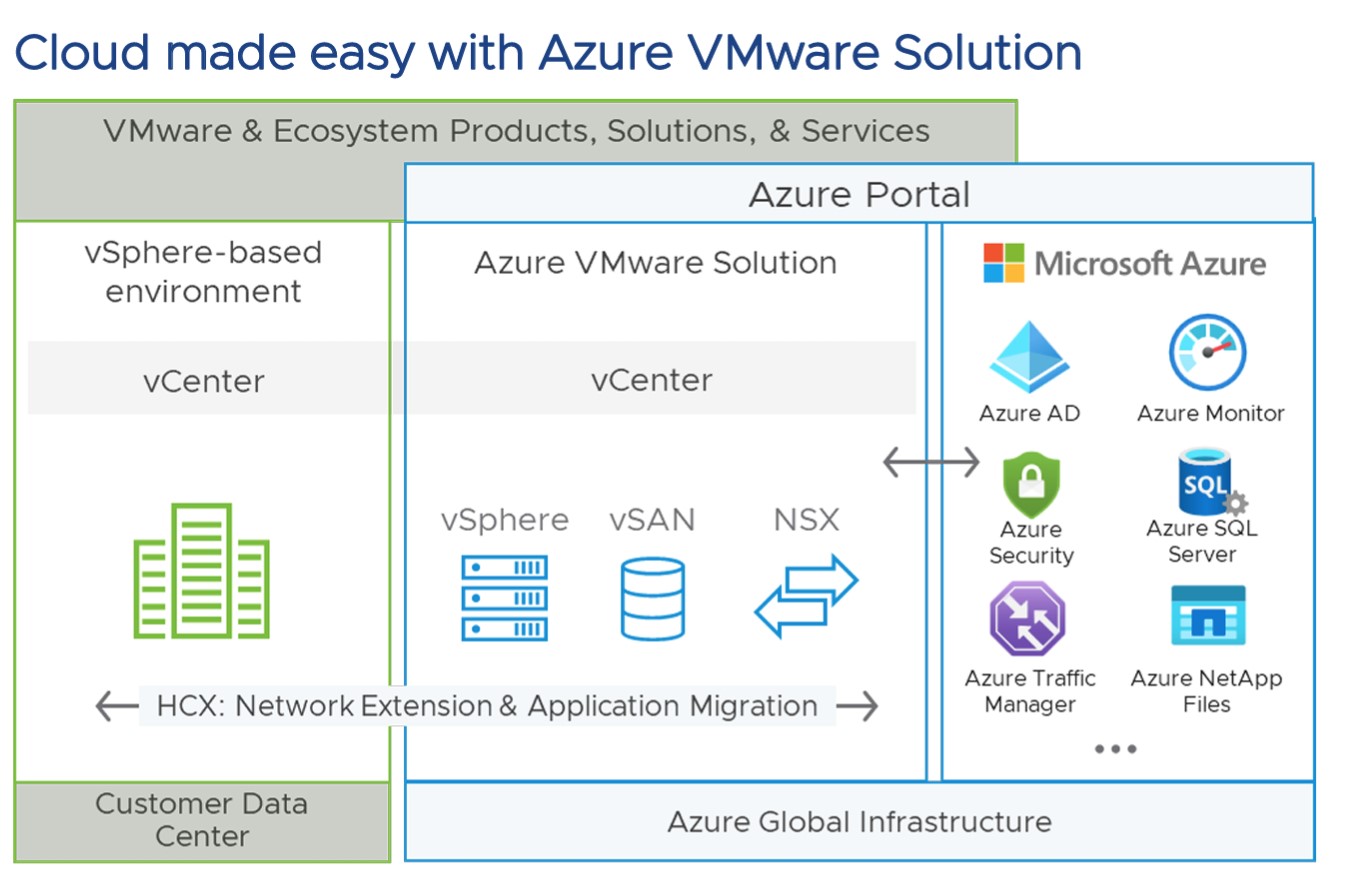
Azure VMware Solution

The Azure VMware Solution allows organizations to maximize their investment in Microsoft workloads, creating a highly cost-effective pathway to cloud migration and application modernization. This solution offers the unique opportunity to run VMware as an integrated Azure service, thereby allowing organizations seamless access to their existing applications while enjoying the power of Microsoft's globally scalable cloud platform.

Azure VMware Solution

  • VMware SDDC integrating VMware vSphere, 
  • VMware vSAN
  • VMware NSX 
  • Storage
  • Networking on Azure
  • Bare-metal infrastructure
  • Offered in more than 24 Azure regions worldwide
  • Azure service jointly engineered with VMware, delivered, operated, and supported by Microsoft
  • Operational consistency with on-premises VMware infrastructure
  • Integrated with Azure Portal and Resource Manager
  • Large-scale workload portability with included VMware HCX Enterprise
  • Deploy in just a couple of hours, scale up/down in minutes
  • Fast access to native Azure services
  • Extend with VMware attached services and partner solutions

Solution to Cloud Migration Challenges 

  • Consistent VMware infrastructure in Azure means workloads run with no changes
  • Live migrate apps in bulk with no downtime using VMware HCX
  • Retain essential VMware SDDC features like high availability, microsegmentation, and storage efficiency
  • VMware skills, operations, and automation transfer directly
  • Manage, monitor, and protect with familiar tools like vCenter and Aria Operations

Migrate to Azure VMware Solution  - Top Use Cases

Data center migration -  Reduce your on-premises infrastructure footprint with a simple migration of sphere-based workloads to Azure in a non-disruptive, automated, and scalable fashion. Microsoft manages the platform, and you get the agility, reliability, and scale of Azure.

Data center extension - With flexible payment plans, quickly scale out data center capacity on-demand to meet seasonal, temporary, or regional needs. Host virtual desktops on Azure VMware Solution with VMware Horizon or other VDI platforms.

Application migration and modernization - Get exclusive licensing and support savings for Microsoft OSes and apps. Enhance and extend apps using Azure backbone network connections to hundreds of Azure services or the VMware Tanzu platform.

Disaster recovery to the cloud - Use the VMware stack deployed in Azure as a fully consistent on-demand disaster recovery site to protect your on-premises infrastructure with VMware Site Recovery Manager or partner solutions.

I hope this has been informative and thank you for reading!

Monday, May 1, 2023

VMware Aria Migration!


IT teams must decide not only where to deploy new workloads and applications, but also whether to transfer existing workloads and apps as organisations transition from a single dedicated infrastructure to a flexible multi-cloud approach. The latter offers a variety of difficulties in relation to the essential processes of analysing, planning, modernising, carrying out, and operationalizing the migration of workloads across various clouds.

VMware Aria Migration is designed to be a one stop shop multi-cloud migration service. It helps simplify and accelerate one of the most difficult tasks many organizations face in their multi-cloud journey. It identifies and migrates workloads and applications to the optimal cloud, based on your goals for security, performance, cost, and time.

Over time, we plan to release three core migration capabilities – assessment, planning, and execution. With this initial release, VMware Aria Migration provides the assessment capabilities. 

The migration assessment capability is FREE! Yes, you read that correctly. VMware will be offering migration assessment capabilities for free. The free assessment service reduces the time and effort required to scope a planned migration and understand its target cloud requirements as well as TCO impact. Free also means that there is no requirement to subscribe to any other services to create migration assessments using VMware Aria Migration.

VMware Aria Hub components and integrations

VMware Aria Hub provides a single user interface that integrates existing management solutions to focus on entity and application management. It also provides business insight analytics that help you keep your applications and the underlying entities as healthy as possible.


What are data source accounts

The connection accounts for your cloud data sources so that VMware Aria Hub can collect data from those systems. The collected data is stored in the VMware Aria Graph database. VMware Aria Hub can then manage your discovered cloud entities both uniquely within VMware Aria Hub and by using integrations with your other VMware Aria services.

What is VMware Aria Graph

With regard to VMware Aria Hub, the Entity Data Service (EDS) stores collected data in the VMware Aria Graph database and reconciles the entity IDs for entities collected from both your data sources and from the integrated VMware Aria services.

What are applications

An application is a collection of business-defined resources and services that operates as a business application. It is not the software or code that makes up a software application.VMware Aria Hub discovers applications using the application discovery service. The service analyzes entity metadata, such as tags and properties, to identify clusters of resources.

What are secure cloud findings

To ensure that your managed resources comply with defined rules, VMware Aria Hub provides findings. VMware Aria Automation for Secure Clouds generates findings when it detects a configuration state that violates the active native or third-party security rules.

I hope this has been informative and thank you for reading!

Sunday, March 26, 2023

Vmware vSphere 8 update 1


Vmware vSphere 8 Update 1 release. Customers gain from improved operational effectiveness for administrators, accelerated performance for more demanding AI/ML workloads, and increased security throughout the environment with this release. According to our new release approach, vSphere 8 Update 1 has officially reached initial availability. General availability will follow.

Enhance Operating efficiency

In vSphere 8, vSphere Configuration Profiles were introduced as a tech preview with some limitations of not supporting vSphere Distributed Switch and NSX. If you have not checked this functionality, read my blog post on what’s new in vSphere 8, which explains this functionality in more detail. But In vSphere 8U1, vSphere Configuration Profile is now fully supported and allows administrators to apply the homogenous configuration at the cluster level.

So you can set the desired configuration at the cluster level in JSON format and check the compliance of the hosts in the cluster; if they are not compliant, you can remediate the hosts to become compliant. But one point to remember, If the cluster has a Host profile attached to it, you will get a warning to remove the Host profile when you want to move to vSphere Configuration Profile. When you transition, you can no longer attach host profiles to the hosts within the cluster. vSphere Configuration Profiles now supports vDS configuration, and it can be activated when you create a new cluster, but environments with NSX still can’t use this technology.


Supercharge Workload Performance

Enhancing the performance of AI/ML workloads is becoming more difficult for organisations. The size of AI/ML workloads is continuously growing, and more GPUs are being used. GPU demand is increasing at an accelerated rate.

Support for NVIDIA NVSwitch: With Update 1, vSphere 8 dramatically speeds up AI/ML application performance with support for NVIDIA NVSwitch (up to 900GB/s bidirectional speed with NVLink on Hopper), which connects up to 8 GPUs per host and up to 8 GPUs to the same VM.


Security

Today's organisations face higher security concerns. Security upkeep can be time-consuming. The security of mission-critical workloads is already boosted by vSphere's built-in security features, and Update 1 adds the following capabilities

  • Okta Federated Identity Management for vCenter​: Update 1 expands vCenter support for 3rd party identity providers to Okta, in addition to Active Directory, OpenLDAP, and Active Directory Federation Services (ADFS). Admins using Okta can log in once for both vCenter and NSX Manager.​ Multi-factor authentication with Okta can also be enabled. This capability improves both efficiency and security for customers’ environment.
  • Support for Fault Tolerance of VMs Employing vTPM: Fault Tolerance provides continuous availability for a VM by maintaining an identical VM that can quickly failover in the event of a failure. Fault Tolerance for a VM employing a vTPM module is now supported. This capability helps admins achieve continuous availability and security for mission-critical VMs.


  • ESXi Quick Boot Support on Servers with TPM 2.0 Chips: Quick Boot is used in lifecycle management activities like patching, upgrades, etc., and saves considerable time. With update 1, TPM 2.0 does not need to be disabled for Quick Boot. Hence, this enhancement saves both life cycle management time for the admins and eliminates security gaps​.


 I hope this has been informative and thank you for reading!

Saturday, December 17, 2022

VMware Aria - Multi-Cloud Management solution

 introducing-vmware-aria

VMware Aria is an intelligent multi-cloud management solution that helps organizations manage their cloud infrastructure and operations. It provides a unified platform to automate and orchestrate the deployment, operation, and optimization of cloud workloads across multiple clouds. 
 
The VMware products and services within the VMware Aria  portfolio are:

VMware Aria Cost

VMware Aria Cost powered by CloudHealth VMware Aria Cost team was excited to announce the release of Anomaly Detection, available for AWS, Azure, and GCP environments.This feature identifies an unusual change in spend and provides you with ownership to analyze and act on unwanted changes – helping cloud adoption become more cost-effective.

VMware Aria Operations

Enable self-driving IT Operations Management across private, hybrid and multi-cloud environments with a unified operations platform that delivers continuous performance, capacity and cost optimization, intelligent remediation and integrated compliance through AI/ML and predictive analytics.

VMware Aria Automation 

Vmware Aria Automation is a modern infrastructure automation platform with event-driven state management. It is designated to help organizations control
and secure self-service multi-cloud with governance and DevOps-based infrastructure delivery
.


VMware Aria cloud management solution to make cloud complexity invisible in support of our customers journey to the cloud. It improves virtual and cloud IT operations across all cloud environments to help you to optimize resource utilization for better cost savings. Furthermore, VMware Aria simplifies the process of managing multi-cloud environments by providing a single point of control for all the cloud services used by an organization.

 I hope this has been informative and thank you for reading!

What is FinOps in VMware Cloud Foundation?

FinOps (Financial Operations) is all about helping IT teams and business leaders understand, control, and optimize cloud spending. VMware Cl...