Friday, January 6, 2017

VMware vSphere Remote Office Branch Office (ROBO) Editions

I was recently working with RFP for one of the Existing customer, this project is for remote site ESXi refresh. I found there is lot of inconsistency with ESXi version. All are running with Enterprise puls and found more than 70 + sites running with less than 15 VMs.

There are various ways that we can go ahead and refresh these ESXi hosts. I found another alternate solution with cost savings called vSphere ROBO ( Remote office Branch office ) licenses which is more cost effective and licenses are provided by VMWARE with virtual machine based pack.

VSphere ROBO is 25 VM’s pack , this is applicable for sites with maximum 25 VMs only and can also be shared between sites.

Customers can purchase these editions in packs of 25 Virtual Machines (VMs). A maximum of 1 pack can be deployed per remote site or branch office. Customers can choose to distribute a pack of 25 Virtual Machines across sites (e.g., 5 VMs in Site 1, 5 VM in Site 2 etc.).

Customers can centrally manage their ROBO hosts using VMWare vCenter server Standard or locally using vCenter server foundation.

VSphere ROBO is available in Standard and advanced version. Here, I will list the key features and components.


I hope this has been informative and thank you for reading!

Thursday, December 8, 2016

VMFS 6 vs VMFS 5 in vSphere

Recently VMware announced Vsphere 6.5 has introduced a new version of VMFS version 6 with lot of new enhancements. This topic will cover major difference between VMFS 5 and VMFS 6.


The upgrade process is slightly change, we can’t upgrade directly existing VMFS 5 volumes to VMFS 6. You have to plan and create new VMFS 6 datastores and migrate the existing VMFS 5 datastores VMs using storage vMotion. Once everything complete then ensure and deleting the VMFS 5 datastores.


Device Sector Formats and VMFS Versions

A sector is a subdivision of a track on a storage disk or device. Each sector stores a fixed amount of data. Traditional 512n storage devices have been using a native 512-bytes sector size. In addition, due to the increasing demand for larger capacities, the storage industry has introduced advanced formats, such as 512-byte emulation, or 512e. 512e is the advanced format in which the physical sector size is 4,096 bytes, but the logical sector size emulates 512-bytes sector size. Storage devices that use the 512e format can support legacy applications and guest operating systems.

When you set up a datastore on a 512e storage device, VMFS6 is selected by default. For 512n storage devices, the default option is VMFS5, but you can select VMFS6.


Automatic Space Reclamation

vSphere 6.5 has introduced automate the configuration of the VMFS UNMAP capability to check current setting or to Enable / Disable it. vSphere 6.5 APIs that have introduced which differ from the vsphere 5.x version.

How to Enable UNMAP setting

New vSphere API called UpdateVmfsUnmapPriority() which accepts the UUID of a VMFS 6 datastore as well as an unmapPriority property which can either be "low" which means it is enabled or "none" which means it is disabled.

VMFS UNMAP settings, there is a new property under the Datastore->Info->Vmfs object called UnmapPriority.

I hope this has been informative and thank you for reading!

Thursday, November 10, 2016

vSphere 6.5: Next gen infrastructure for your next generation

VMware has released this new On Demand course

VMware vSphere 6.5 is the next gen infrastructure for next gen apps. With vSphere 6.5 you can now run, manage, connect, and secure your applications in a common operating environment, across clouds and devices. vSphere 6.5 introduces features that elevate your experience to an entirely new level including:


Be ready to take advantage of all everything vSphere 6.5 can provide with training from VMware Education Services.


Monday, November 7, 2016

vSphere 6.5 vCenter server backup and restore

Vsphere 6.5 vCenter server is built-in fail-based backup and restore option is available vCenter server Appliance.
This will help you to backup your vCenter while VC services are still running.

HTTP,HTTPS,FTP,SCP,SFTP transfer protocols supported vCenter server appliance backup and restore.

Here sharing details with FTP transfer protocol vCenter server appliance backup and restore steps.


This will help you to backup your vCenter while VC services are still running.

vSphere 6.5 VM and vMotion Encryption

Vsphere 6.5 new feature with VM encryption and vMotion, this will help you to secure VM's and VMotion. VM encryption securing the hypervisor level with the kernel doing most of the work. this keeps the VM from having to run its own encryption processes.

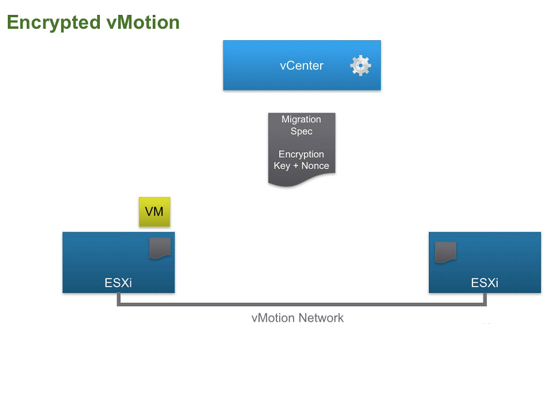
vMotion Encryption is designed VMs get a randomly generated certificate from vCenter which is packaged up and forwarded to the participating vMotion hosts for the VM's transfer, protecting the data. 


I hope this has been informative and thank you for reading!

Saturday, October 29, 2016

VMware vRealize Log Insight 4.0

VMware announced Log Insight’s new major release 4.0, scheduled for a vague “later this year”. According to VMware’s announcement, this release is focused on delivering a brand new user interface based on Clarity standard, enhanced alert management capabilities, with a centralised interface and historical views, and better integration with vSphere, vRealize, and other VMware products.

In detail the new functionalities introduced by vRealize Log Insight 4.0 are:


New Server Capabilities
  • New Clarity UI
  • vSphere 6.5 compatibility
  • New Admin Alerts Management UI
  • FIPS-compliant deployment
  • Octet-framing over TCP
  • Public Installer APIs


Improved Agent Capabilities
  • Agent Auto-Update

New General UI Items
  • DeviceID to name Aliasing
  • New “field does not exist” filter
  • New gauge chart
  • New “blur” on session timeout

New Tech Preview Features
  • Agent scripted-input
  • vIDM SSO Support


What is FinOps in VMware Cloud Foundation?

FinOps (Financial Operations) is all about helping IT teams and business leaders understand, control, and optimize cloud spending. VMware Cl...