Saturday, April 9, 2022

vCenter Converter is currently unavailable.


VMware has announced that they will no longer support vCenter Converter. This is a precautionary measure to protect customers from potential risk of using this tool.

The company has taken the decision to discontinue the software as it was originally designed for a different era of computing and IT. The new generation of virtualization tools and cloud computing services have made vCenter Converter obsolete.

One of our top goals is to maintain the safety and stability of our customers’ workloads. As part of a technology’s evolution, we must consider the technical standards the customers must comply with. When a straightforward update cannot meet compliance requirements, the product needs to undergo a thorough rebuild. This is the case with vCenter Converter, whose functionality will be migrated to a modern platform based on a reliable technology stack.

The vCenter Converter team is aware of the challenges that customers are facing with this tool and is working on a renewed version.

Vmware is in progress of designing a product that will be more robust and resilient to changes in technology.

Vmware team currently cannot commit to any specific timelines, but we are working hard on making it available as soon as possible.

I hope this has been informative and thank you for reading!

Saturday, March 12, 2022

VMware vRealize Automation


What is VMware vRealize Automation?

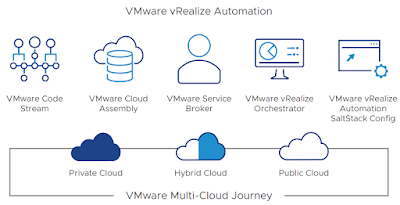
VMware vRealize Automation is a modern infrastructure automation platform with event-driven state management. It is designated to help organizations control and secure self-service hybrid clouds, multi-cloud automation with governance, and DevOps-based infrastructure delivery. With vRealize Automation, internal IT operations, DevOps engineers, developers, and the lines of business get the environments and resources that they need faster with a public cloud-like user experience, while IT maintains security, compliance, and control. This means that customers benefit from increased scalability, speed, flexibility and reliability as they reduce the complexity of their IT environment, streamline IT processes, and deliver a DevOps-ready automation platform.


vRealize Automation components

VMware Cloud Assembly

VMware Cloud Assembly is a multi-cloud provisioning service. For virtualized data center infrastructure based on VMware Cloud Foundation, it offers the ability to create a private cloud. VMware Cloud Assembly provides a cloud API layer utilized by the templating engine. It also supports extensibility mechanisms for private cloud through VMware vRealize Orchestrator workflows and event-broker subscriptions.

VMware Service Broker

VMware Service Broker aggregates content from multiple resources and platforms, including VMware Cloud Assembly, vRealize Orchestrator, and native public clouds, into a common product catalog. It provides a self-service model with flexible, policy-based guardrails for governance. Enable a federated catalog by leveraging vRealize Automation Cloud™ for on-premises instances.

VMware Code Stream

VMware Code Stream automates the application and infrastructure delivery process with release pipeline management, including visibility and analytics into active pipelines and their status for troubleshooting. It allows DevOps teams to leverage existing tools and processes with out-of-the-box integration.

VMware vRealize Orchestrator

vRealize Orchestrator simplifies and automates complex data center infrastructure tasks, delivering consistent remediation of issues, extensibility and fast service delivery.

VMware vRealize Automation SaltStack Config

SaltStack Config can easily define optimized, compliant software states and enforce them across your entire environment—virtualized, hybrid or public cloud—with powerful, intuitive configuration automation.

I hope this has been informative and thank you for reading!

Saturday, February 5, 2022

vSphere 7 Update 3c

Vmware ESXi 7 Update 3 release from the market. This was to protect our customers from some potential failures as they upgrade to ESXi 7 Update 3 and our desire to minimize customer exposure to them. Also, Vmware resolved the issues and re-released ESXi 7 Update 3 to the market as part of vSphere 7 Update 3c.

For information on this release, please visit:

New features

  • vSphere Memory Monitoring and Remediation, and support for snapshots of PMem VMs: vSphere Memory Monitoring and Remediation collects data and provides visibility of performance statistics to help you determine if your application workload is regressed due to Memory Mode. vSphere 7.0 Update 3 also adds support for snapshots of PMem VMs. For more information, see vSphere Memory Monitoring and Remediation.
  • Extended support for disk drives types: Starting with vSphere 7.0 Update 3, vSphere Lifecycle Manager validates the following types of disk drives and storage device configurations:
    • HDD (SAS/SATA)
    • SSD (SAS/SATA)
    • SAS/SATA disk drives behind single-disk RAID-0 logical volumes
  • vSphere Cluster Services (vCLS) enhancements: With vSphere 7.0 Update 3, vSphere admins can configure vCLS virtual machines to run on specific datastores by configuring the vCLS VM datastore preference per cluster. Admins can also define compute policies to specify how the vSphere Distributed Resource Scheduler (DRS) should place vCLS agent virtual machines (vCLS VMs) and other groups of workload VMs.
  • Improved interoperability between vCenter Server and ESXi versions: Starting with vSphere 7.0 Update 3, vCenter Server can manage ESXi hosts from the previous two major releases and any ESXi host from version 7.0 and 7.0 updates. For example, vCenter Server 7.0 Update 3 can manage ESXi hosts of versions 6.5, 6.7 and 7.0, all 7.0 update releases, including later than Update 3, and a mixture of hosts between major and update versions.
  • New VMNIC tag for NVMe-over-RDMA storage traffic: ESXi 7.0 Update 3 adds a new VMNIC tag for NVMe-over-RDMA storage traffic. This VMkernel port setting enables NVMe-over-RDMA traffic to be routed over the tagged interface. You can also use the ESXCLI command esxcli network ip interface tag add -i <interface name> -t NVMeRDMA to enable the NVMeRDMA VMNIC tag.
  • NVMe over TCP support: vSphere 7.0 Update 3 extends the NVMe-oF suite with the NVMe over TCP storage protocol to enable high performance and parallelism of NVMe devices over a wide deployment of TCP/IP networks.
  • Zero downtime, zero data loss for mission critical VMs in case of Machine Check Exception (MCE) hardware failure: With vSphere 7.0 Update 3, mission critical VMs protected by VMware vSphere Fault Tolerance can achieve zero downtime, zero data loss in case of Machine Check Exception (MCE) hardware failure, because VMs fallback to the secondary VM, instead of failing. For more information, see How Fault Tolerance Works.
     
  • Micro-second level time accuracy for workloads: ESXi 7.0 Update 3 adds the hardware timestamp Precision Time Protocol (PTP) to enable micro-second level time accuracy. For more information, see Use PTP for Time and Date Synchronization of a Host.
     
  • Improved ESXi host timekeeping configuration:  ESXi 7.0 Update 3 enhances the workflow and user experience for setting an ESXi host timekeeping configuration. For more information, see Editing the Time Configuration Settings of a Host.

I hope this has been informative and thank you for reading!
What is FinOps in VMware Cloud Foundation?

FinOps (Financial Operations) is all about helping IT teams and business leaders understand, control, and optimize cloud spending. VMware Cl...