Tuesday, August 22, 2017

New Certification - VMware vSAN 2017 Specialist


The VMware vSAN 2017 Specialist badge holder is a technical professional who understands the vSAN 6.6 architecture and its complete feature set, knows how to conduct a vSAN design and deployment exercise, can implement a live vSAN hyper-converged infrastructure environment based on certified hardware/software components and best practices, and can administer/operate a vSAN cluster properly.

I hope this has been informative and thank you for reading!

New Certification - VMware vRealize Operations 2017 Specialist


The VMware vRealize Operations 2017 Specialist is a technical professional who plans, manages and helps scale software-defined data center (SDDC) and multi-cloud environments through unified monitoring, automated performance management, cloud planning and capacity optimization. The badge holder helps organizations streamline and automate IT operations from applications to infrastructure across physical, virtual and cloud environments. 

This badge and associated requirements cover vRealize Operations 6.2 through vRealize Operations 6.5


I hope this has been informative and thank you for reading!

Thursday, August 10, 2017

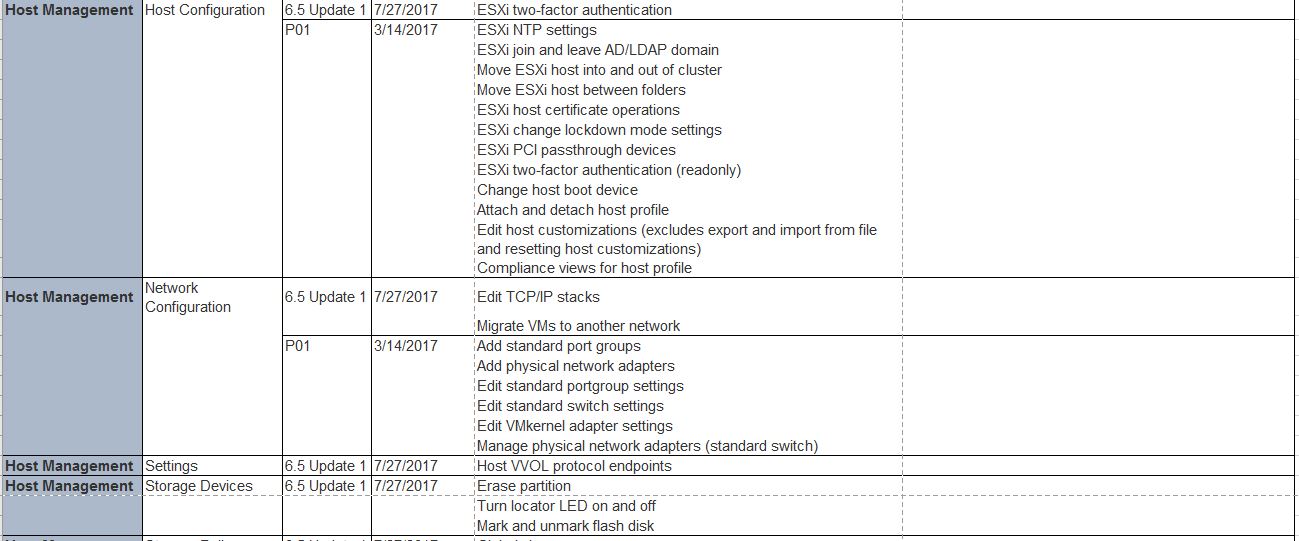
Unsupported & Supported Functionality for the vsphere web client 6.5


Unsupported Functionality


The following table documents the vSphere Web Client workflow functionality not currently supported in the vSphere Client.


Supported Functionality

The following table documents the vSphere Web Client workflow functionality added in releases after VMware vSphere 6.5.


I hope this has been informative and thank you for reading!

Wednesday, August 2, 2017

vSphere 6.5 Update 1 Released

vSphere 6.5 Update 1 is now available and it has some great enhancements. While we have seen 5 patch releases so far, 6.5 Update 1 rolls all of those updates together as well as includes some long awaited functionality.

General Updates and Enhancements

vSphere 6.5 Update 1 allows customers who are currently on vSphere 6.0 Update 3 to upgrade to vSphere 6.5 Update 1. All of the security and bug fixes that were part of 6.0 U3 are now included in 6.5 U1 whereas before, upgrading from 6.0 U3 to 6.5 prior to U1 would have put customers in a more risky position due to the timing of the releases. That concern is a thing of the past now, though, and we anticipate even more customers will begin their upgrade journeys.

It is important to note that customers who are still on vSphere 5.5 will need to be on at least vSphere 5.5 U3b in order to upgrade to vSphere 6.5 U1. This may mean a two-step process for some customers to get to vSphere 6.5 U1 but this is necessary in order to ensure the best possible outcome for the upgrade.

vCenter Server 


vSphere 6.5 Update 1 we’re increasing some of the maximums configuration.
  • Maximum vCenter Servers per vSphere Domain: 15 (increased from 10)
  • Maximum ESXi Hosts per vSphere Domain: 5000 (increased from 4000)
  • Maximum Powered On VMs per vSphere Domain: 50,000 (increased from 30,000)
  • Maximum Registered VMs per vSphere Domain: 70,000 (increased from 50,000)

With the increasing use of hybrid and private clouds, the increase in capacity comes at a crucial time.

vSphere Client

vSphere Client can be accessed via https://<vcenterfqdn>/ui and it is completely built on HTML5, requires no plugins, and it lightning fast. If you’ve been following along with the Fling version, the version in vSphere 6.5 Update 1 is roughly equivalent (actually a bit newer) than the bits in v3.15 of the Fling. You can view the items that we’re still working on getting into the vSphere Client.

vSAN 6.6.1

  • vSphere Update Manager (VUM) Integration: The manual process of checking the VMware Compatibility Guide to ensure the upgraded version was supported with the specific hardware has been automated with a completely new Update Manager workflow.
  • Performance Diagnostics: The vSAN Cloud Analytics capabilities have been improved with a proactive Performance Diagnostics feature that analyzes the performance of a given vSAN cluster against previously executed benchmarks.
  • vSAN Licensing for ROBO and VDI: VDI and ROBO licensing editions are expanded with an Enterprise model that allows encryption and stretched clusters.
I hope this has been informative and thank you for reading!

Tuesday, August 1, 2017

VMware Announces General Availability of vSphere 6.5 Update 1

VMware is excited to announce the general availability of vSphere 6.5 Update 1. This is the first major update to the well-received vSphere 6.5.With this update release, VMware builds upon the already robust industry-leading virtualization platform and further improves the IT experience for its customers. Many customers,have already benefited from upgrading to vSphere 6.5 to help address the challenges of digital transformation. For customers who have yet to upgrade, vSphere 6.5 Update 1 serves as a validation milestone signaling to them product stability and that now the right time to upgrade.


vSphere 6.5 focuses on 4 areas of innovation directly targeted at the challenges customers face as they digitally transform their businesses.

Simplified customer experience – Re-architected vCenter Server Appliance, streamlined HTML5-based GUI, and simple rest-based APIs for automation.
Comprehensive Built in Security – Policy-driven security at scale to secure data, infrastructure, and access.
Universal App Platform – A single platform to support any application, anywhere.
Proactive Data Center Management – Predictive analytics to address potential issues before they become serious problem.

vSphere 6.5 Update 1 further refines vSphere 6.5 while also adding key additional support and enhancements including:

vSphere Client Now Supports 90% of General Workflows

The HTML5-based vSphere Client now can support up to 90% of general workflows.  This is welcomed news as VMware pushes towards 100% parity between the various clients.

vCenter Server Foundation Now Support 4 Hosts

In discussions with customers with smaller environments, VMware has received feedback that 3 host environments were too small in many cases.  If VMware vCenter Server Foundation could just support 1 additional host that would make all the difference.  This is why with vSphere 6.5 Update 1 VMware is now increasing the number of hosts that vCenter Server Foundation will support from 3 host to 4.

vSphere Support and Interoperability Across Ecosystems

VMware prides itself on having one of the broadest ecosystems across any industry.  As with any new product, at initial release, some partners were not ready with compatible versions of their products.  Many of these incompatibilities are now a thing of the past, as we have worked with our partners to test and ensure interoperability.  Furthermore, the ecosystem is also expanding as we forge new alliances to add vendor support for things such as Security Key Management and Proactive HA, to name a few.

vSphere 6.5 General Support Has Been Extended

VMware understands that upgrading infrastructure can be a lengthy process.   One consideration for whether or not to upgrade is how long the new product will be supported.  VMware wants to make the customer’s decision to upgrade easier by extending general support for vSphere 6.5 for a full 5 years.  This means that support for vSphere 6.5 will now end November 15, 2021.

Upgrade from vSphere 6.0 Update 3 Now Supported

Customers who are on vSphere 6.0 Update 3 now have a supported upgrade path to vSphere 6.5.

I hope this has been informative and thank you for reading!

Friday, July 28, 2017

vSAN 6.6.1 with VUM Integration

This is a timeless idea that could not be more true when it comes to software design.  It’s one of the reasons why so many IT organizations are looking to replace complex infrastructures requiring the expertise of storage, networking and compute professionals with HCI solutions like VMware vSAN. This concept of simplicity being the “ultimate sophistication” was the first thing I thought of when I learned about the integration of VMware vSphere Update Manager (VUM) in vSAN 6.6.1.

Today’s IT admins understand the complexity of keeping infrastructures up to date. This has traditionally been a manual task with multiple sources of truth to get to the right update/upgrade, patch, driver levels; a complex, manual task with high risk of human error.

vSphere Update Manager (VUM) performs zero-downtime patching and upgrading of VMware ESXi clusters and is a very popular update tool for many VMware environments. VMware engineers decided to integrate VUM into vSAN with one goal in mind: Simplicity. As a result, vSAN patch and version management is not only a process now fully integrated in vSAN but the VUM process itself has been drastically simplified.

VUM High Level Architecture


vSAN 6.6.1 and later provides a seamless automated update process to ensure a vSAN cluster is up to date with the best available release to keep your hardware in a supported state. vSAN version recommendations are automatically generated using information from the VMware Compatibility Guide, the vSAN Release Catalog, and awareness of the underlying hardware configuration. This also includes the necessary drivers and patch updates for the recommended release in its system baseline. vSAN build recommendations will make sure that the clusters will remain at the current hardware compatibility status or better. In cases, where the existing cluster is not on HCL, vSAN will recommend users upgrade to the latest release. The key point here is that this vSAN baseline will only be updated to the highest level of compatibility based on your environment, making the upgrade process a much more predictable experience.

Configuring vSphere Update Manager

The first step is to add your my.vmware.com credentials to the vSAN Build Recommendation Engine. After successful login vSAN will generate a baseline group of recommended updates for each vSAN cluster. vSAN system baselines are listed in the Baselines pane of the Baselines and Groups tab.


vSAN Build Recommendation

For hosts running 6.0 Update 1 and earlier, use the Ruby vSphere Console to enter the My VMware credentials. To enter My VMware credentials from RVC, run the following command: vsan.login_iso_depot -u <username> -p <password>

vSAN Build Recommendations in vSphere Update Manager

vSAN build recommendations are provided through vSAN system baselines for Update Manager. In Figure 3 the 7 hosts in my vSAN cluster are running 6.0 Update 2. After checking the VMware Compatibility Guide and the vSAN Release Catalog, using the vSAN baseline, Update Manager determined there is a recommended update available.  As a result, all 7 hosts are non-compliant. The next step is to remediate.


Note: vSAN baselines are read-only and managed by vSAN.  They exist alongside user created baselines. Users can continue to create and remediate their own baselines as they wish. All baselines can either be remediated on a per-host or a per-cluster basis.

Updating a vSAN Cluster

To update the vSAN cluster, simply use the remediate feature of Update Manager. The Remediate wizard offers several options to customize the upgrade:

  • Select the desired hosts as the target of your remediation.
  • Schedule the upgrade to run immediately or at a later date and time.
  • Specify Maintenance Mode options (i.e. VM power state, removable media handling and ESXi patch settings)
  • Specify cluster remediation options. When remediating a cluster, you should temporarily disable certain cluster features. Update Manager will automatically re-enable the features after remediation.
After selecting the desired options, Update Manager will perform a rolling upgrade of each host, non-disruptively migrating your VMs to other hosts during the upgrade. While the host is offline vSAN marks all components on the host as absent. To ensure availability, if for some reason, the patched host does not come back online within 60 minutes (default CLOM timer delay), vSAN will start rebuilding these components on other hosts just like it would in any other host-offline situation. Upon completion of the upgrade you will notice each host is now placed in the Compliant tab.

Before using Update Manager in vSAN 6.6.1 be sure to verify the following:

  • If running a Windows-based vCenter Server, verify Update Manager is installed and configured.
  • vSAN requires Internet access to update release metadata, to check the VMware Compatibility Guide, and to download ISO images from My VMware.
  • vSAN requires valid My VMware (my.vmware.com) credentials to download ISO images for upgrades.
I hope this has been informative and thank you for reading!

What is FinOps in VMware Cloud Foundation?

FinOps (Financial Operations) is all about helping IT teams and business leaders understand, control, and optimize cloud spending. VMware Cl...